Creating a Window on Wayland from Scratch in Pure Python.
Published on 21 Dec, 2025
This post is still an unfinished draft.
I wanted to see what kind of wizardry graphics toolkits like Qt or GTK perform when they create a window on a Wayland desktop. It takes surprisingly little code to achieve the bare minimum goal of creating a window and drawing a static image to it. In this article, I will walk through everything I learned about summoning a window on Wayland, using nothing but Python's standard library.
The final code we'll end up writing by the end of this article is also available in its entirety here.
What does Wayland do?
I was confused about what role Wayland plays in the graphics stack. As an end user, all I've ever had to do is use a graphics toolkit and a window appears. But what I hadn't considered was other windows. Something must be compositing all the things visible on the screen (the panels, multiple windows, the desktop wallpaper, the cursor, etc.) into a single image that you can display on a monitor. This is the key role a Wayland compositor fulfills on the desktop among other important things (like handling input).
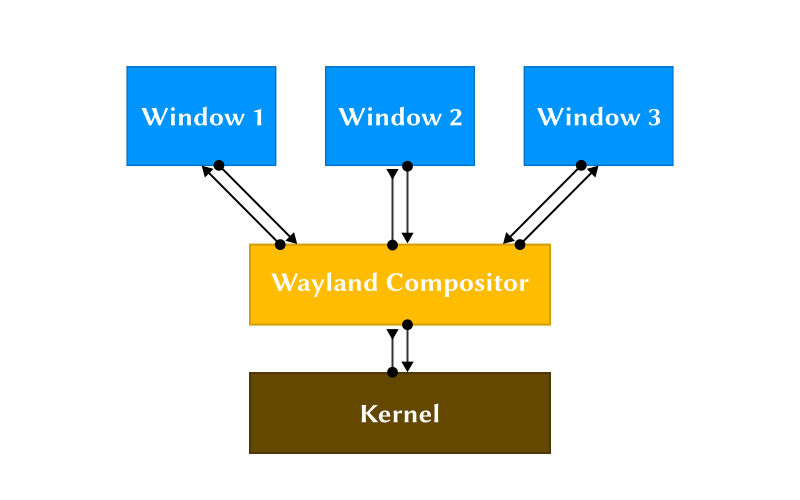
However, Wayland itself is not a compositor; it's the protocol that a conforming compositor and a client use to talk to one another. But how do you talk to a Wayland compositor?
Making a Connection to the Wayland Server
A client can use a Unix domain stream socket to communicate with a Wayland server. These are local sockets that allow processes on the same host to talk to one another efficiently (they have another trick up their sleeve that we'll use later on). Let's start writing our first lines of code. We can use the socket module to create a Unix domain socket:
1 2 3 4 5 6 7 | import socket def setup_socket(): sock = socket.socket(family=socket.AF_UNIX, type=socket.SOCK_STREAM, proto=0) return sock |
This creates the socket, but we haven't yet made a connection to the Wayland compositor. To find the path required to connect to the compositor, we can do the following:
1 2 3 4 5 6 7 8 9 10 11 12 13 14 15 | import os import socket def setup_socket(): sock = socket.socket(family=socket.AF_UNIX, type=socket.SOCK_STREAM, proto=0) name = os.getenv("WAYLAND_DISPLAY", default="wayland-0") if not name.startswith("/"): xdg_runtime_dir = os.getenv("XDG_RUNTIME_DIR", default=f"/run/user/{os.getuid()}") name = f"{xdg_runtime_dir}/{name}" sock.connect(name) return sock |
First, we check if the WAYLAND_DISPLAY environment variable is set. If not, we'll assume a default value of
"wayland-0". Next, if the WAYLAND_DISPLAY variable is not an absolute path, we prepend the XDG_RUNTIME_DIR
environment variable to this value, with a default value set to "/run/user/<user-id>". We have the path we need, so we
call connect() on the socket we created earlier.
We are now ready to talk to the compositor. We just need to figure out what to say.
Learning How to Speak Wayland
Wayland is an object-oriented protocol. Every message we'll send or receive, to or from the server will be associated
to an object. Objects have an interface associated with them which is defined in
wayland.xml. This file can typically
be found inside /usr/share/wayland if you have the necessary package installed (wayland-devel on Fedora).
The interface for each object defines requests a client can invoke on the object, and events that the server can emit for that object. Events need not be emitted in response to a request, for example if the user tries to resize your window the server will spontaneously emit an event to let you know. Each request and event can also define arguments, each with an associated type that we'll come back to later. This is what the corresponding XML looks like:
<protocol name="wayland">
    <interface name="some_object">
        <request name="some_request">
            <arg name="some_arg" type="some_primitive"/>
            ...
        </request>
        ...
        <event name="some_event">
            <arg name="some_arg" type="some_primitive"/>
            ...
        </event>
        ...
    </interface>
</protocol>
Wire Format
Our conversation with the server will be about creating objects, invoking requests and receiving events associated with a particular object, and eventually destroying that object. So we need a way to serialize this object talk into a byte stream we can send over the socket we created earlier. Here's what that looks like:
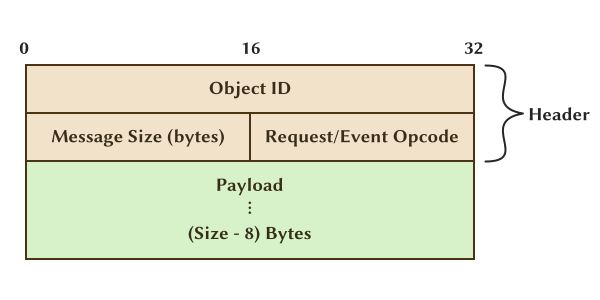
The above depicts the structure of a message in the wayland protocol. All fields in the message are aligned to 32-bit words which are represented in the host's byte order. The first field in the header is the object ID. It is a 32-bit unsigned integer that we assign to an object upon its creation. Both sides will make a note of this mapping to allow identifying objects with a number.
The next field in the header is another 32-bit unsigned integer split into two 16-bit parts. The first part is the size of the entire message (header + payload) in bytes. The second part is the opcode for either the request if the message originates from the client, or the event if it originates from the server. The opcode is implicitly defined by the order in which requests or events appear inside the object's interface in the XML file. The first request defined in an interface corresponds to the opcode 0, the next to 1 and so on. Do note that requests and events are indexed separately.
Let's create a class to store the header:
1 2 3 4 5 6 7 8 9 10 11 12 13 | import os import socket from dataclasses import dataclass @dataclass class Header: obj_id: int opcode: int size: int = 0 ... |
We should also add a way to serialize this header into bytes we can send on the wire:
1 2 3 4 5 6 7 8 9 10 11 12 13 14 15 16 17 18 | import os import socket import struct from dataclasses import dataclass @dataclass class Header: obj_id: int opcode: int size: int = 0 def serialize(self): size_and_opcode = (self.size << 16) | self.opcode return struct.pack("=II", self.obj_id, size_and_opcode) ... |
We're first combining the size and opcode fields into a single 32-bit integer as described by the wire format. If
you were to treat them as two distinct 16-bit words, you'd have to flip the order of size and opcode for
little-endian hosts. Then, we use struct.pack to convert our Python integer objects into bytes we can send over the
wire. The first argument to struct.pack is the format string, which exactly matches the header format we discussed
earlier: "=" declares that we want the resulting bytes to use the host's byte order and the "II" defines two 32-bit
unsigned integers.
Next we'll add a method to instantiate the Header class from bytes received on the wire:
1 2 3 4 5 6 7 8 9 10 11 12 13 14 15 16 17 18 19 20 21 22 23 24 25 26 | import os import socket import struct from dataclasses import dataclass from io import BytesIO @dataclass class Header: ... @staticmethod def frombytes(data: BytesIO) -> "Header | None": data = data.read(8) if len(data) != 8: return None obj_id, opcode_and_size = struct.unpack("=II", data) opcode = opcode_and_size & 0xFFFF size = opcode_and_size >> 16 return Header(obj_id, opcode, size) ... |
We are reading 8 bytes (the size of a header) from the received data and interpreting each 32-bit word (4 bytes) as an
unsigned integer. The first is the object ID, and the second packs both the size and the opcode, which we have to split.
We can extract the opcode by using a bit-mask of 0xFFFF, which extracts the lower 16-bits. Then the size field can be
extracted by bit shifting the entire 32-bit integer to the right by 16-bits.
Next, we should store this Header in a new Message class that stores both the header and the payload:
1 2 3 4 5 6 7 8 | @dataclass class Message: header: Header payload: bytes def serialize(self): self.header.size = 8 + len(self.payload) return self.header.serialize() + self.payload |
The payload consists of arguments for the particular request or event referenced in the header. Arguments are also aligned to 32-bits, padding is added wherever required.
Primitives
As we saw earlier in the XML specification:
<arg name="some_arg" type="some_primitive"/>
arguments are defined with a type attribute associated with them. The wayland protocol defines the following types:
int: A 32-bit signed integer
uint: A 32-bit unsigned integer
fixed: Signed 24.8 decimal number. It is a signed decimal type which offers a sign bit, 23 bits of integer precision and 8 bits of decimal precision.
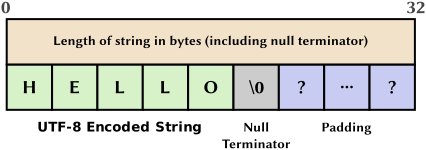
string: Starts with an unsigned 32-bit length (including null terminator), followed by the UTF-8 encoded string contents, including terminating null byte, then padding to a 32-bit boundary. A null value is represented with a length of 0. Interior null bytes are not permitted.
object: 32-bit unsigned integer. A null value is represented with an ID of 0.
new_id: Same as
object, used to indicate creation of new objects. If an arg tag having the attributetype="new_id"does not specify an interface attribute as well in the XML, then this new_id value is preceded by astringspecifying the interface name to be used for the creation of the new object and anuintspecifying the version.array: Starts with 32-bit array size in bytes, followed by the array contents verbatim, and finally padding to a 32-bit boundary. We will not encounter the usage of this type on the client side in this article.
fd: A file descriptor. This is not sent in the usual message we'd send on the socket, rather it uses a special transport mechanism provided by unix domain sockets called anciliary data.
We can now start implementing these types in Python. First, let's create a base class all of our types will
inherit from so we can specify two methods all types should implement. These are: frombytes to instantiate the type
from bytes received on the wire, and serialize to convert the Python type to bytes we can send over the wire.
1 2 3 4 5 6 7 8 9 10 11 12 13 14 15 16 17 | import os import socket import struct from dataclasses import dataclass from io import BytesIO class WlPrimitive: @staticmethod def frombytes(data: BytesIO) -> "WlPrimitive": raise NotImplementedError def serialize(self) -> bytes: raise NotImplementedError ... |
Next, we create a class for uint:
1 2 3 4 5 6 7 8 9 10 | @dataclass class UInt32(WlPrimitive): value: int @staticmethod def frombytes(data: BytesIO) -> "UInt32": return UInt32(struct.unpack("=I", data.read(4))[0]) def serialize(self) -> bytes: return struct.pack("=I", self.value) |
As a reminder, = denotes the host's byte order and I denotes an unsigned 32-bit integer. Implementing int is the
same, but we'll switch the capital I for a small i instead to denote a signed 32-bit integer:
1 2 3 4 5 6 7 8 9 10 | @dataclass class Int32(WlPrimitive): value: int @staticmethod def frombytes(data: BytesIO) -> "Int32": return Int32(struct.unpack("=i", data.read(4))[0]) def serialize(self) -> bytes: return struct.pack("=i", self.value) |
Both object and new_id can be implemented as an alias to the UInt32 class:
1 2 3 4 5 6 | class ObjID(UInt32): pass class NewID(UInt32): pass |
To implement the string type, we'll need a way to calculate how much padding we should append to the end. Let's create
a function to do just that:
1 2 | def padding(length: int) -> int: return (4 - (length % 4)) % 4 |
length is the length of the string including the null terminator. 4 - (length % 4) tells us how many additional
bytes we require to make the string length divisible by 4 bytes (32-bits). The additional modulo at the end handles the
edge cases where length % 4 evaluates to 0. In that case, 4 - (length % 4) evaluates to 4 - 0 = 4, but if the
length is already divisible by 4, we do not require padding, so we take the modulo again to collapse this 4 back to
0. With that, we can implement the string type:
1 2 3 4 5 6 7 8 9 10 | @dataclass class String(WlPrimitive): value: str @staticmethod def frombytes(data: BytesIO) -> "String": length = UInt32.frombytes(data).value value = data.read(length - 1) data.read(1 + padding(length)) return String(value.decode("utf8")) |
We'll first read a uint from the received byte stream, which tells us the length of the string. We then read
length - 1 bytes to get the value of the string (without the null terminator). Then we discard the remaining bytes
containing the null terminator and padding (if any). To serialize the Python string to bytes:
1 2 3 4 5 6 7 8 9 10 11 12 13 14 15 16 17 18 19 | @dataclass class String(WlPrimitive): value: str @staticmethod def frombytes(data: BytesIO) -> "String": length = UInt32.frombytes(data).value value = data.read(length - 1) data.read(1 + padding(length)) return String(value.decode("utf8")) def serialize(self) -> bytes: value = bytes(self.value, "utf8") value += b"\0" # Null Terminator size = len(value) value += b"\0" * padding(size) return UInt32(size).serialize() + value |
We first convert the Python string to utf8 encoded bytes using the built-in bytes() function. Then we append a null
terminator. Calculate the total length of the string (including null terminator). Add padding if required. Finally,
prepend the length of the string in bytes as an uint.
Next, we'll implement the array type:
1 2 3 4 5 6 7 8 9 10 11 12 13 14 15 16 | @dataclass class Array(WlPrimitive): value: bytes @staticmethod def frombytes(data: BytesIO) -> "WlPrimitive": size = UInt32.frombytes(data).value value = data.read(size) data.read(padding(size)) return Array(value) def serialize(self) -> bytes: size = len(self.value) data = UInt32(size).serialize() + self.value data += b"\0" * padding(size) return data |
array is parsed similarly to the string type: read a uint as the length, read length amount of bytes and discard
any padding. To serialize to bytes: serialize the length as an uint, append the data, then any padding if required.
The fd type does not serialize to any bytes in the byte stream, and I didn't encounter any usage for receiving the
fd type so we'll skip that. This becomes rather easy to implement:
1 2 3 4 5 6 | @dataclass class Fd(UInt32): value: int = 0 # the value here will not be used so any arbitrary value works def serialize(self) -> bytes: return b"" |
Finally, we're only left with the fixed type, but we will not encounter its usage in this article so we'll skip
implementing it altogether.
Now that we have these types defined, we should update the type annotations on the Message and Header classes to
use these types:
1 2 3 4 5 6 7 8 9 10 11 12 13 14 15 16 17 18 19 20 21 22 23 24 25 | import os import socket import struct from dataclasses import dataclass from io import BytesIO from typing import List ... @dataclass class Header: obj_id: ObjID ... @dataclass class Message: header: Header payload: List[WlPrimitive] ... ... |